Navigation menu
hello Guest

Administrator Manual
Instructor
To enroll an instructor, click the Enroll tab, select the Enroll as an instructor option and provide the following details:
If you are a new user, you are required to provide additional details:
Finally, click the Submit button.
You can create users with student or instructor permission in the same way as you enroll the student or the instructor. You can also enroll the student or the instructor without course. To do so, leave the Access Code option blank.
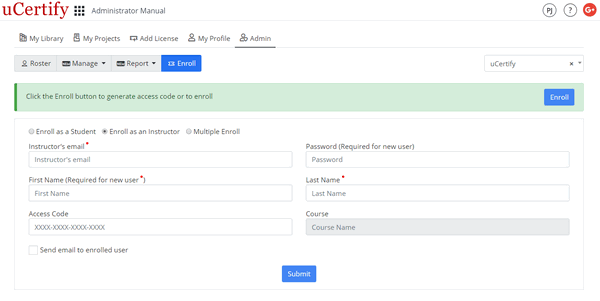
Figure 5.8: Enroll Page with Enroll as an Instructor Button
- Access code
If you are a new user, you are required to provide additional details:
- Password
- First Name
- Last Name
Finally, click the Submit button.
You can create users with student or instructor permission in the same way as you enroll the student or the instructor. You can also enroll the student or the instructor without course. To do so, leave the Access Code option blank.
Figure 5.8: Enroll Page with Enroll as an Instructor Button