Navigation menu
hello Guest

Administrator Manual
Enrollments
Click the Report tab and select the Enrollments option. Now, define search criteria using "Advance Search" under the "Search" button OR enter email/name in the search text box and click on the search icon to list Enrollments. The Enrollments page will open that contain Enrolled user name or email address, Course Name (CRN), Permission (License Type), Order Number (Bill Type), On Date (Time Passed), and Expire On (Time).
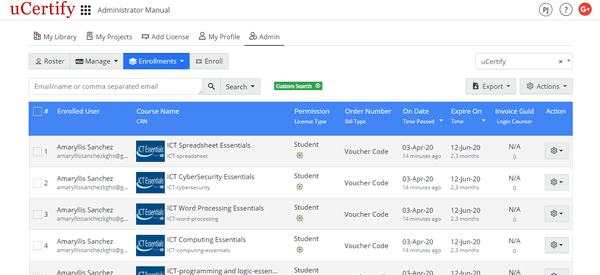
Figure 4.1: Enrollments Page
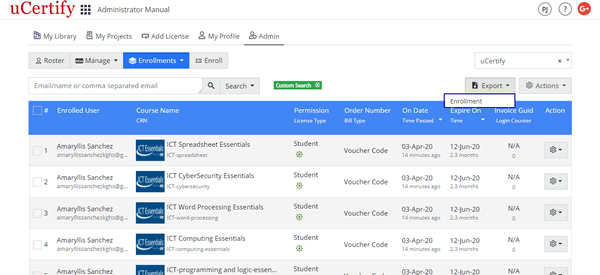
Figure 4.2: Export Menu of Enrollments Tab with Enrollment Option
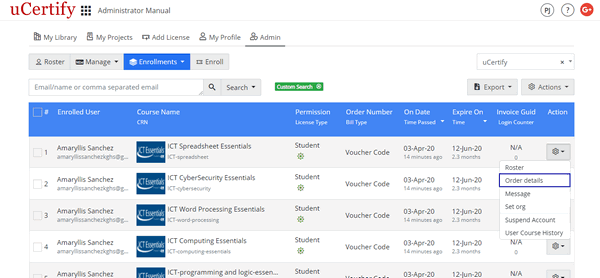
Figure 4.3: Settings Menu of the Administrators Page with Order details Option
Figure 4.1: Enrollments Page
- Export Enrollment Report: To export and view the enrollment report in excel sheet, click the Export menu, and select the Enrollment option.
Figure 4.2: Export Menu of Enrollments Tab with Enrollment Option
- Settings Menu: To view the order details of the enrolled user, click the settings menu parallel to the enrolled user name or email address, and select the Order details option.
Figure 4.3: Settings Menu of the Administrators Page with Order details Option